
 vs
vs
CoConstruct stops taking new projects on April 1, 2027, and its builders are being moved to Buildertrend. Before you go where you're sent, see the platform built to win the job, not just run it: AI estimates from an address, a photo or a prompt, interactive proposals with selections in the checkout, and a schedule, budget and RFQs that build themselves from your estimate.
Backed by Y Combinator · trusted by builders and remodelers across North America





Buildertrend bought CoConstruct and is retiring it. Here's the timeline every CoConstruct builder is working to.
Buildertrend acquires CoConstruct.
CoConstruct stops selling to new customers.
Last day to start a new project in CoConstruct. From April 1, no new projects.
Migration off CoConstruct must be underway. Past projects stay viewable.
CoConstruct has no sales tools: no interactive proposals, no checkout, no upsells. Here's what changes when your software sells for you.
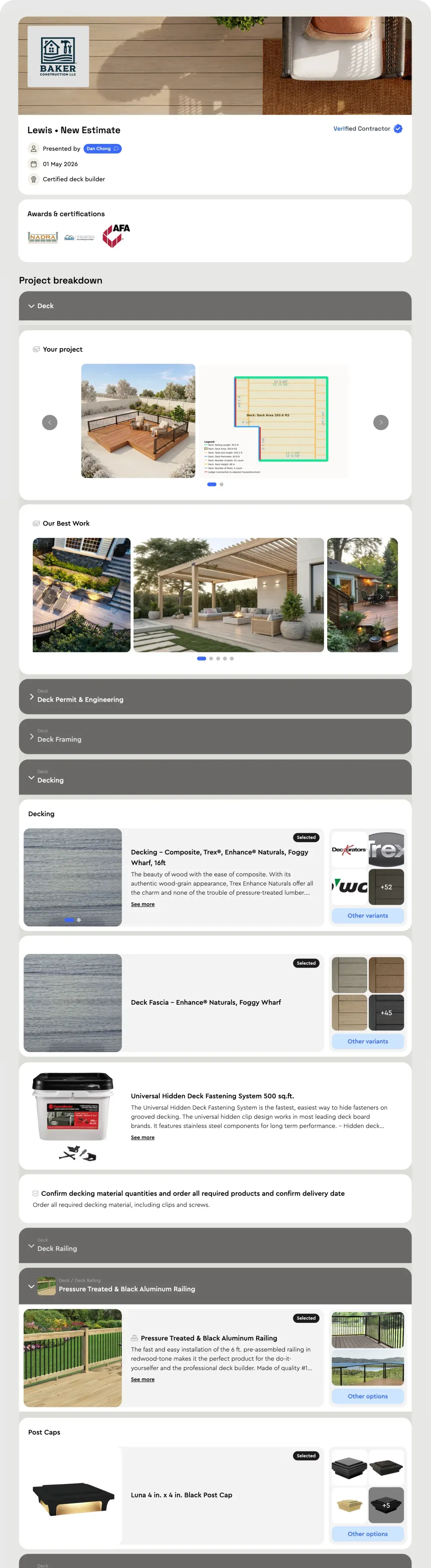
In CoConstruct, selections are a separate chore you chase after the job is signed. In Bolster they're part of the sale. Your client opens an interactive proposal, picks their options and good/better/best upgrades, watches the price update, then signs and pays the deposit in the same checkout. Every decision is made while they're excited to buy, so jobs close faster and come in bigger.
Type an address, snap a photo or describe the job, and Bolster's AI builds the estimate. Every line is priced by AutoCost from 100M+ real items with live, local material and labor costs. CoConstruct estimates start from cost data you maintain by hand.

If you're switching anyway, switch to where the industry is going. Describe a project and Bolster's Construction Intelligence scopes the work, builds the estimate, measures the takeoff, and produces renderings and a client-ready proposal like the one shown.

Every line in a won estimate already knows its quantities, costs and trades. Bolster uses that to set up the job for you.
You have to move off CoConstruct anyway. Moving to Bolster means AI does the setup and you bring your data with you.
Describe the work you do and Bolster builds your estimate templates and assemblies for you.
Bring your cost catalog, client list and vendor list across with Bolster's import tools.
Move your active projects in. Past CoConstruct projects stay viewable there, so only bring what's live.
A Bolster specialist sets up your account with you and trains your team.
CoConstruct covers daily logs, messaging, purchase orders, a GPS time clock, bid requests and payments. Every one of them has a home in Bolster, and most of them get an upgrade.
Everything CoConstruct does, plus the sales tools, automation and payments it never had.
| Feature | |
CoConstruct |
|---|---|---|
| The value | ||
| More jobs won, on average | +20% | NoneNo sales enablement |
| Bigger jobs from in-checkout upgrades | +15% | NoneNo upsells at checkout |
| Less time spent quoting | 84% | —No live pricing or AI |
| Sales & estimating | ||
| AI estimating | From an address, photo or prompt | None |
| Material & labor pricing | Live and regional (AutoCost) | Entered by hand |
| Spreadsheet estimating | ||
| Item library & assemblies | ||
| On-screen takeoff | ||
| Bids & presentations | ||
| Proposals | Interactive, with checkout | Standard |
| Selections & upgrades | Inside the checkout | Separate process |
| Optional & upgradable items in proposals | ||
| Sign and pay the deposit in one checkout | ||
| Visualizations of the finished job | ||
| E-signatures & approvals | ||
| Project management | ||
| Scheduling | Automated | Manual or template |
| Budget & material list | Automated | Budget only |
| Daily logs | Automated | Manual |
| Client portal | With visualizations & scheduling | Standard |
| Change orders | ||
| Chat with team, subs and clients | Messaging | |
| Field app | Mobile app | |
| Subcontractors & vendors | ||
| RFQs & bid management | Automated from the estimate | Manual bid requests |
| Vendor portal | Free takeoff & bid tools | Trade partner access |
| Purchasing | Purchase orders | |
| Subcontractor payments | —Not listed | |
| Lien waivers | —Not listed | |
| Holdbacks & retainage | —Not listed | |
| Automated vendor document management | —Not listed | |
| Time tracking | ||
| Geo time tracking | GPS time clock | |
| Item-by-item time tracking | —Not listed | |
| Get paid | ||
| Progress payments | Automatic as tasks complete | Sent by hand |
| Same-day payments | —Not listed | |
| ACH & card payments | Buildertrend Payments | |
| Business account (wallet) | —Not listed | |
| Marketing & CRM | ||
| CRM & lead management | ||
| Lead forms | —Not listed | |
| OpenQuotes: customer self-serve estimating | ||
| Embeddable estimating wizard | ||
| Onboarding & support | ||
| AI template builder | ||
| Import items, clients & vendors | —Not listed | |
| Import current jobs | —Not listed | |
| 1:1 onboarding | Closed to new customers | |
| Integrations | ||
| QuickBooks | ||
| CompanyCam | —Not listed | |
| Hover | —Not listed | |
| The platform | ||
| Open for new projects after March 2027 | Closed to new projects Apr 1, 2027 | |
| Actively developed | Being retired into Buildertrend | |
| Plan price doesn't rise with project volume | Moves to Buildertrend volume pricing | |
"Not listed" means the feature does not appear in CoConstruct's published feature list as of October 2026.
"It's like online shopping. They see the item, they see the price, and they can choose."
Book a free demo and see one of your own jobs become a priced, client-ready proposal, with selections your clients can make themselves.
Book a free demo


