Choosing a Buildxact alternative for residential building
Buildxact and Bolster both start where a residential job starts: the estimate. Buildxact grew up in Australia, where it has been used by builders since 2011, and now sells in the US, Canada, the UK and New Zealand. Bolster is built for North American residential contractors. This page compares the two on the work that decides whether a job is profitable: pricing the estimate, winning the client, getting paid and running the build. Buildxact details come from buildxact.com and help.buildxact.com, checked November 9, 2026. If you want a wider list, see our guide to the best Buildxact alternatives.
What Buildxact does well
Buildxact is a capable plan-takeoff and estimating tool. You load PDF plans, measure areas, lengths and counts on screen, and link those measurements to items and assemblies in your catalog. Every plan includes unlimited users, purchase orders, lead management, digital signatures on quotes and a dealer integration that can pull catalogs from suppliers, including Home Depot Pro Xtra in the US. Its Blu AI tools can draft an estimate from a description, help with takeoff and check an estimate for missing costs. Training and setup help are free, and there is a 14-day trial without a credit card. If plan takeoff is the center of your week and you have a team of estimators, those are real strengths.
Estimating and takeoff
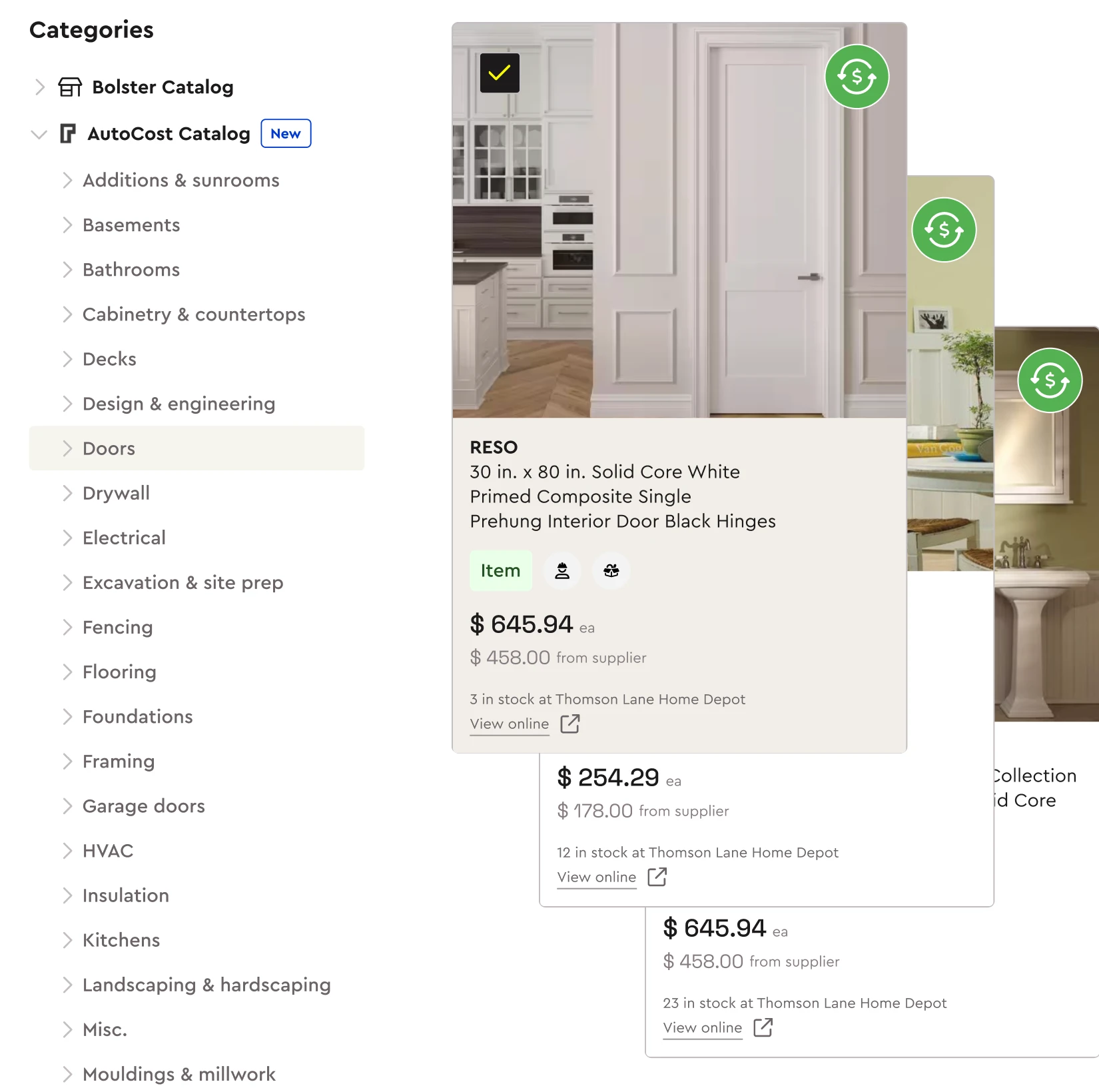
The biggest difference is where prices come from. In Buildxact, item prices live in your catalogs, which you keep current through Excel price files or a connected dealer catalog. That works well when you buy from one dealer and keep the catalog tidy. Bolster takes a different approach: AutoCost prices every line with live, regional material and labor costs drawn from more than 100 million items, so a new estimate starts from current local prices without a price book to maintain.
Both products do on-screen takeoff with items and assemblies linked to the measurements. Bolster also measures from photos and satellite images, which helps remodelers and exterior trades who often work without a full plan set. On AI, Buildxact's Estimate Generator is included on Pro and is a $99/mo add-on on Foundation, while Blu Takeoff and the Estimate Reviewer are included on Master or sold as add-ons on Pro. Bolster's Construction Intelligence builds the scope, estimate, takeoff and a photoreal rendering from an address, photo or prompt, and it is included on Pro. Contractors using Bolster spend 84% less time estimating. More on the estimate itself is on our estimating software page.
Proposals, selections and change orders
Buildxact produces a customizable quote letter. The client can accept and sign it online, and optional extras can be listed in the specifications, but the client cannot tick options on and off in the quote. Selections and change orders are available on the Pro plan through the client portal.
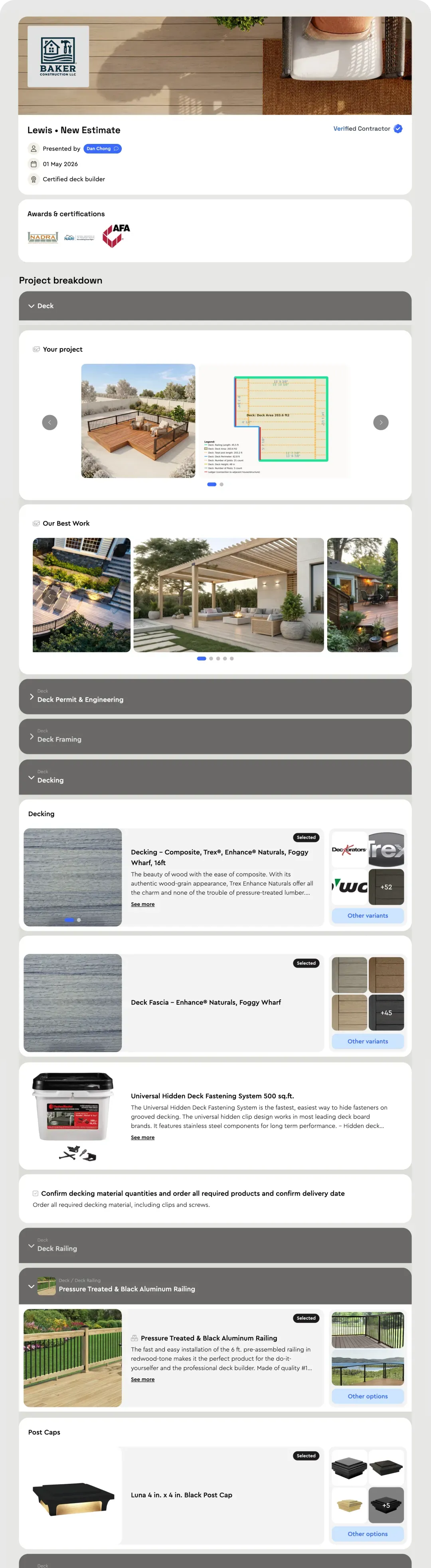
A Bolster proposal is interactive. The client sees photos and descriptions for each part of the job, adds optional items and upgrades and watches the total change, then signs and pays the deposit in one checkout. When a client changes a selection later, the change order is created from it. Contractors using Bolster win 20% more jobs on average, and in-checkout upgrades make the jobs they win bigger.
Getting paid
This is the clearest gap. Buildxact's help center states that it does not have an online payment gateway. Builders record payments by hand, or issue the invoice from QuickBooks to take a card, with payments syncing back. Progress invoicing, including retention, is on the Pro plan.
Bolster has payments built in from the Core plan. Clients pay the deposit inside the proposal, progress payments are requested as tasks are completed, and clients pay by ACH or card. Same-day payments are available, and the Bolster Wallet business account works in the US and Canada.
Scheduling and running the job
Buildxact Pro adds Gantt scheduling with dependencies, job costing against the estimate, daily logs, timesheets, RFQs and the Onsite mobile app for crews, who join free. Those are solid tools, and they sit on the Pro plan rather than Foundation.
Bolster generates the schedule, material list and budget from the signed estimate, so nothing is re-entered after the sale. Crews use the field app, the office uses the management app, and clients follow progress in the client portal.
Pricing compared
Buildxact publishes three plans with unlimited users: Foundation at $169/mo billed annually ($199 month to month), Pro at $339/mo billed annually ($399 month to month) and Master at $509/mo billed annually ($599 month to month). Blu AI usage draws on a monthly credit allowance, with extra credits available to buy. There is no published onboarding fee.
Bolster also publishes its pricing. Core is $155/mo billed annually for estimates, proposals, payments and the CRM. Pro is $399/mo billed annually with 3 users and adds AutoCost live pricing, AI estimating, AI takeoff, automated scheduling and the QuickBooks, CompanyCam and Hover integrations. There is no onboarding fee, and the plan price does not rise with the number of projects. If you have a large office team, Buildxact's unlimited users are worth weighing against that.
Which one fits your business
Choose Buildxact if most of your estimating is takeoff from full plan sets, you buy mainly through one connected dealer, you use Xero, or you need many office users on one plan. Choose Bolster if you want estimates priced with live regional costs, proposals that let clients choose upgrades and pay the deposit, and payments built in from the first plan. Comparing more tools? See Bolster vs JobTread or the full comparison hub.
Frequently asked questions
What are the best Buildxact alternatives?
Buildxact is estimating and takeoff software for residential builders, with job management on its Pro plan and Blu AI tools included or sold as add-ons depending on the plan. Builders look at alternatives when they want prices that stay current without maintaining price files, a proposal the client can option, sign and pay, or payments built in, since Buildxact has no online payment gateway. Bolster covers those: AI estimating and AutoCost live pricing on Pro, and proposals with a deposit checkout from Core. The table below compares them line by line.
How much does Buildxact cost?
Buildxact publishes three plans, all with unlimited users: Foundation at $169/mo billed annually ($199 month to month), Pro at $339/mo billed annually ($399 month to month) and Master at $509/mo billed annually ($599 month to month). Blu AI add-ons cost $99 to $149/mo on the lower plans, and there is a 14-day free trial. Prices are from Buildxact's pricing page, checked November 9, 2026.
How is Bolster different from Buildxact?
Both estimate from plans with on-screen takeoff and assemblies, and both offer AI estimating. Bolster prices each line with AutoCost live regional costs, turns the estimate into an interactive proposal with options and a deposit checkout, and takes ACH and card payments. Buildxact includes unlimited users on every plan, connects to Xero as well as QuickBooks, and links to dealer catalogs such as Home Depot Pro Xtra in the US.
Does Buildxact take online payments?
Not directly. Buildxact's help center says it does not have an online payment gateway, so builders record payments or issue the invoice from QuickBooks to accept a card. Bolster takes ACH and card payments inside the proposal and on progress invoices, with same-day payments available.
How much does Bolster cost?
Bolster Core is $155/mo billed annually and covers estimates, proposals, payments and the CRM. Pro is $399/mo billed annually with 3 users and adds AutoCost live pricing, AI estimating, AI takeoff, automated scheduling and the QuickBooks, CompanyCam and Hover integrations. Premium, at $6,999 a year, adds RFQs and purchase orders.